 Old Phone Cam
Watch your camera on a PC, laptop, iPhone or iPad
You don’t need to install anything on the computer. The camera phone shows a QR code and a Share link; open it in a modern browser on a PC, Mac, iPhone or iPad and the live picture appears. On the same Wi-Fi this is free; from anywhere else it needs Premium on the camera phone.
▶ Get it on Google Play Free download · Android 8.0 or newer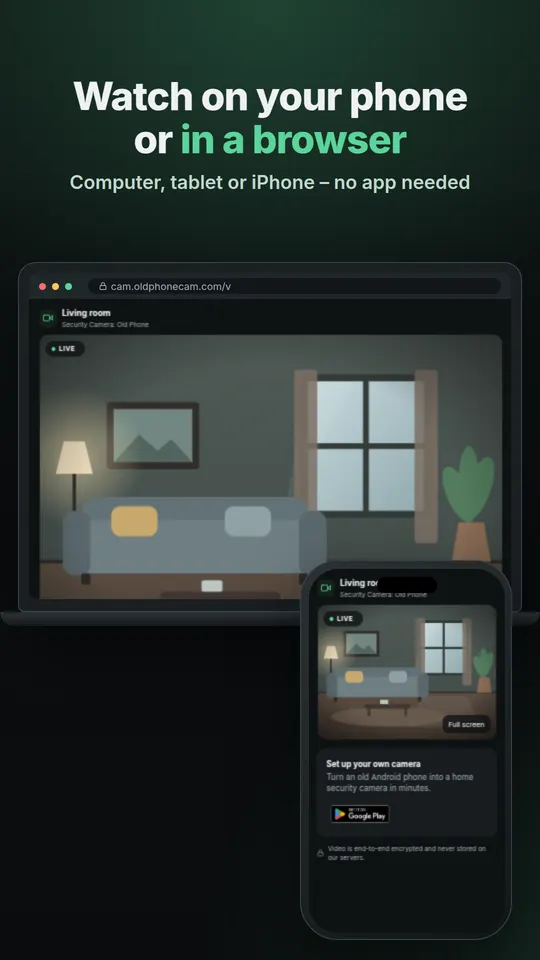
How to open your camera in a web browser
- Start the camera phoneOpen the app on the old Android phone and choose As a camera. The Connect a viewer screen appears.
- iPhone or iPad: scan the QR codePoint the regular Camera app at the QR code and tap the banner. The camera opens in Safari.
- Computer: send yourself the linkTap Share link on the camera phone and send it to yourself by email or a messenger, then open it on your laptop or PC.
- Or use the address and code at homeOn the same Wi-Fi you can also type the address shown on the camera phone into the browser and enter the 6-digit code.
- Bookmark itLinks work for 7 days. After that, share a new link; you can remove old ones under Settings › Connected devices.
Why there is no Windows, Mac or iOS app
Security Camera: Old Phone has an Android app for the camera and the viewer. Everything else watches in the browser. For you that means nothing to install on a work laptop, no app store for an iPad, and the same live view on any device with a modern browser such as Chrome, Safari, Edge or Firefox.
The browser viewer shows the live picture end-to-end encrypted, just like the app. The camera itself must still be an Android phone with Android 8.0 or newer; an old iPhone can’t be the camera. If that’s what you have, AlfredCamera runs as a camera on iOS 12+ (as of November 2026). See our AlfredCamera alternative page for the differences.
Motion notifications arrive in the Android viewer app, so if you want alerts as well as the browser view, pair an Android phone too.
Free on home Wi-Fi, Premium for away
On the free plan, the link works when the computer or iPhone is on the same Wi-Fi as the camera phone. That is enough for a home office setup: keep the live view in a browser tab next to your work and see when the kids get home or what the dog is up to.
To open the link from another network, such as your office, a hotel or mobile data, the camera phone needs Premium. Premium is a monthly plan, a yearly plan with a 3-day free trial, or a one-time lifetime purchase. More in watching from anywhere.
One practical tip for laptops: keep the browser tab in its own window if you want to glance at it, since some browsers slow down background tabs.
Keeping browser access under control
A link is a key, so treat it like one. Send it only to people who should see the room, and share it in a private chat rather than a group. Every link and paired device is listed on the camera phone in Settings › Connected devices with when it was last used. Remove access disconnects open browsers immediately.
Links expire on their own after 7 days, which suits a babysitter or neighbor feeding your cat for a week. The camera phone also keeps showing a notification and a LIVE indicator while it runs, so it’s never a mystery that the camera is on.
If you think a link has been passed on further than you meant, use Remove everyone (new code). Every viewer and link is cut off, the pairing code changes, and you can share a fresh link with the people who should still have it.
Ways to watch
| Device | How | Away from home |
|---|---|---|
| Android phone or tablet | App, “As a viewer” | Premium |
| iPhone, iPad | Scan the QR code with the camera, opens in Safari | Premium on the camera phone |
| Windows PC, Mac, Chromebook | Share link in a browser | Premium on the camera phone |
| Any device at home | Address shown on the camera phone + 6-digit code | Home Wi-Fi only |
Frequently asked questions
Is there a home security camera app for PC?
You don’t need one. Open the share link from the camera phone in Chrome, Edge, Firefox or Safari on your PC and you see the live picture.
Can I watch on an iPhone without an app?
Yes. Scan the QR code on the camera phone with the iPhone camera, and the live view opens in Safari.
Can I use my iPad as a pet camera viewer?
Yes, the same way: scan the QR code or open the share link in Safari. The camera itself must be an Android phone.
Why did my link stop working?
Links expire after 7 days or when access is removed. Away from home they also need Premium on the camera phone. Share a fresh link, or see camera offline fixes.
Do I get motion alerts on my computer?
Motion notifications come through the Android viewer app. In a browser you watch the live picture.
Your old Android phone can watch your home tonight: install the app, scan one QR code, plug it in.
▶ Get it on Google PlayLast updated: