 Old Phone Cam
Use an old phone as a pet camera for your dog or cat
Yes, a spare Android phone works well as a pet camera. Install Security Camera: Old Phone, point the phone at your dog’s or cat’s favorite spot and pair your own phone by QR code. You get a live picture and motion alerts with snapshots; there is no sound and no treat tossing.
▶ Get it on Google Play Free download · Android 8.0 or newer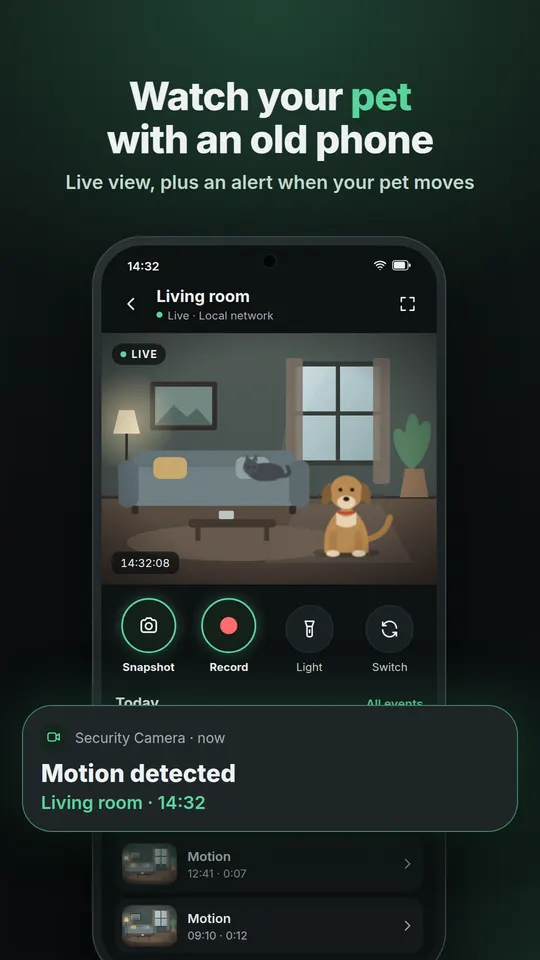
How to set up a pet camera with an old phone
- Pick the spot your pet actually usesThe bed, the couch, the crate or the area by the door. Aim low enough that a small dog or cat isn’t just a shape at the bottom of the frame.
- Install the app and choose “As a camera”Use any Android phone with Android 8.0 or newer. Allow camera access and notifications.
- Pair your own phoneOpen the app on your phone, choose As a viewer and scan the QR code. On an iPhone, scan the code with the regular camera to watch in the browser.
- Secure the phone and plug it inPut it high enough that a curious pet can’t knock it over or chew the cable. Keep it on the charger and out of direct sun.
- Tune motion alertsTurn on Motion detection. High catches small movements like a cat jumping down; Low stops you getting a ping every time your dog rolls over.
What is a dog camera, and do you need one?
A dog camera, or pet camera, is simply a camera you watch your pet through while you are out. Dedicated pet cameras are sold as devices, and some add things like treat tossing or two-way audio. If you mainly want to see that your dog is calm, that the cat hasn’t opened the pantry, or when the walker arrived, an old phone does the core job: a live picture and an alert when something moves.
What you give up with our app: there is no sound, so you can’t hear barking or talk to your pet, and there is no treat dispenser. As of November 2026, AlfredCamera and AtHome Camera do have two-way talk, if that matters to you; see the app comparison.
Checking on your pet from work
On the free plan you can watch live and get motion alerts while your phone is on the same Wi-Fi as the camera, which is handy for checking on a puppy from the bedroom or the yard. To check in from the office, the gym or a trip, you need Premium. It adds remote live view and alerts away from home, 30 days of event history and 10-second motion clips saved on the camera phone.
Premium comes as a monthly plan, a yearly plan with a 3-day free trial, or a one-time lifetime purchase, with local prices shown in Google Play. Step-by-step: watching your camera from anywhere.
A tip for long days: the Events tab is often more useful than live view. Scroll through the snapshots to see when your dog moved to the window or when the cat started her zoomies, without watching for hours.
Pet-proofing the setup
- Cable. Run the charger cable behind furniture or through a cable cover. Puppies and rabbits chew cables.
- Height. A shelf or the top of a bookcase, angled down, keeps the phone out of reach and shows more floor.
- Heat. Don’t put it on a sunny windowsill. The app warns you when the phone gets warm.
- Light. Leave a lamp on if you’ll check in after dark. Premium’s low-light mode brightens the picture in software, but it is not night vision and can’t see in a fully dark room.
- Screen. Tap Dim screen so the glow doesn’t attract attention or keep a pet awake; the camera keeps running.
- Battery setting. Set the app’s battery use to Unrestricted so Android doesn’t stop the camera halfway through the day. The app shows a banner if this is still on.
Before your first full day out, run a test while you’re home: leave the room for half an hour, then check the Events tab to see what the camera caught.
Old phone pet cam vs. a dedicated pet camera
| Old phone + this app | Dedicated pet camera | |
|---|---|---|
| Cost | Free app, phone you already own | Price of the device |
| Live video | Yes | Yes |
| Motion alerts with snapshot | Yes | Depends on the model |
| Sound / talk to your pet | No | Many models |
| Treat tossing | No | Some models |
| Watch from work | With Premium | Depends on the model |
General comparison; dedicated pet cameras vary by brand and model.
Frequently asked questions
Is there a free pet camera app for Android?
Yes. Security Camera: Old Phone is free for one camera with live view and motion alerts on your home Wi-Fi, without an account. Watching from outside the home needs Premium.
Can I watch my pet camera on an iPhone or iPad?
Yes, in the browser. Scan the QR code with the iPhone or iPad camera, or open the share link from the camera phone. The camera itself must be an Android phone.
Can I talk to my dog through the app?
No. The app has no microphone or speaker features. If you want two-way talk, AlfredCamera and AtHome Camera offer it as of November 2026.
Will my pet trigger lots of alerts?
If the pet is in view, yes, which is usually the point. Set sensitivity to Low if you only want bigger movements, or aim the camera at the door instead of the dog bed.
Can I use a pet camera with no subscription?
Yes. Free covers home Wi-Fi, and Premium is also sold as a one-time lifetime purchase. See cameras without a subscription.
Your old Android phone can watch your home tonight: install the app, scan one QR code, plug it in.
▶ Get it on Google PlayLast updated: